Shadowdark item cards
Shadowdark item cards in Magic Item Forge are a white card with a black title bar, and they print a gear slots line when you fill that field. You write the item yourself, then print it or save a PDF from the browser. There is no account.
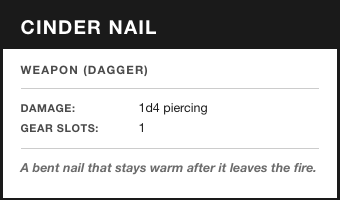
What prints
The card face is white. The border and the title bar are black, and the item name is white. Type and subtype sit under the title. Damage, armor, charges, and the other fields you fill come next. Gear slots print only when that field has a value. The same item fields as the D&D template are available. This template changes the card face.
How to print one
- Open Magic Item Forge.
- Choose the Shadowdark template.
- Enter the item. Fill gear slots when the item uses them.
- For poker size, set the print layout to the standard card: 63 by 88 millimetres, three per row on A4. Then print, or save as PDF.
The editing session stays in the browser. If you publish a share link, that snapshot is stored for 90 days and you can revoke it. The tool is free.
Decks of the published items
On 2 November 2026, a search for “shadowdark item cards printable” led with two decks of the core book’s items. Magic Item Forge does not reprint those items.
- Patrick9000, Shadowdark Cards for Google Docs is a Google Doc of all 85 spells and 97 magic items from the Shadowdark RPG core book, plus empty templates for homebrew, at 88 by 63 millimetres. Checked 2 November 2026.
- Magic Item Cards for Shadowdark RPG, by Taylor Seely-Wright, is a paid PDF. Its description says the pack contains 96 magic items from Shadowdark core on poker-sized cards. The details table on the same page lists a card count of 97. Added to the catalog on 22 March 2024, last updated 14 September 2024. Checked 2 November 2026.
Use those when you want the published items already typeset. Use Magic Item Forge when the item is one you wrote and you want gear slots on this card face, in the same editor as your D&D cards.